Monday, March 16, 2020

Web Dev Trends 2020

https://academind.com/learn/web-dev/trends-2020/
Web development is always evolving and changing. The tools and technologies we used 8 years ago have often already been replaced with new alternatives.
So what’s hot in 2020, which topics should you be aware of and explore in the new year?
Here are my top seven trends (not ordered in any particular order)!
Not a reader? Don’t miss the video on top of this page!

Not a Trend: The Basics

Okay, before we explore the actual trends, here’s the most important thing: You need to know the basics.
In web development it’s too easy to get overwhelmed by all the technologies and choices you have. But if you’re relatively new to the field, you should simply focus on the core basics before you explore all these more advanced frameworks and concepts.
And the basics are always the same in the end: HTMLCSS and most importantly JavaScript (with NodeJS you can also use JavaScript to write server-side code!).
I also have a complete article + video about a possible web development learning path, so definitely also check that out.

Trend 1: Learn & Explore Frontend JavaScript Frameworks

Okay, this trend is only an important trend for you if you’re at least a bit into frontend or fullstack web development. As a pure backend developer, you can ignore it.
It’s also not a new trend - JavaScript frameworks have been around for quite some time. But they’re more important than ever before!
We build more and more applications for the web and more and more desktop applications are getting replaced by web applications.
The user interfaces of all those apps are extremely complex and elaborate and building them with vanilla JavaScript only can become almost impossible (or at least very error-prone).
JavaScript frameworks like React.jsAngular or Vue make building such UIs way easier. They allow you to focus on your core business logic instead of the nitty-gritty details.
If you haven’t looked into them yet, you should definitely explore one of the three big ones (mentioned above) in 2020.
Diving into two can also be interesting, simply because it broadens your horizon and helps to understand the idea those frameworks follow.
Which one is best? They’re all great, if you’re interested, I got this comparison though.

Trend 2: Website Performance & Optimization

Website performance and speed matters!
If you’re living in a country like the USA or Germany, you’re probably used to fast internet (well, in Germany, you might not be) - both at home as well as on your mobile phone.
But this is not the standard in the entire world. Indeed a huge amount of internet users visits the web on slow devices - both regarding the internet speed as well as the device speed.
Since we build ever-more complex user interfaces and web applications, it’s crucial to keep performance in mind.
Performance includes many things:
  • Startup time (i.e. bundle size => How big is your app, how much data must be downloaded by the browser?)
  • Runtime performance (=> How fast is your app once it has been loaded?)
  • User experience (=> Is content jumping around, is the page accessible?)
To improve performance, you can look into many things.
There are obvious factors like the size of your (shipped and compressed) codebase but there are also factors like image sizes and types as well as how and when you load and render content on the screen.
If you google for “website performance” or similar terms, you’ll find plenty of resources.
I can strongly recommend some resources provided by Google:

Trend 3: Microservices

Microservices are a buzzword and hot topic.
What are “Microservices” about though?
The core idea is simple: You want to split your application (no matter if it’s a backend API or a frontend user interface) into small, mostly independent pieces.
Why?
Because that makes it easier to manage and update your codebase - especially when working on bigger projects and in a team.
Basically, apps using a microservice architecture are the opposite of monolithic applications.
If you were building an online shop, you could for example split your backend database and API into these services:
  • A service for managing users (signup, login)
  • A service for administrating products (CRUD)
  • A service for registering orders (cart management, create orders etc)
You could also build just one huge API that talks to a single database and for some (maybe also many) apps, this might work and be absolutely fine.
But it means that every change you make needs to be checked against your entire codebase. If you’re working on a team, splitting work might also be harder and different changes made in different parts of the code could interfere.
When following a microservices approach, every part has to be built such that it works standalone - this of course makes it easier to manage and maintain.

Trend 4: Serverless Applications

This is not a new trend but it’s still an extremely important one.
“Serverless” does not mean that we don’t use servers anymore - we do (our app has to be served from somewhere after all).
But the idea of serverless applications is that you don’t have to manage and administrate those servers on your own anymore.
Instead you can use dedicated services like AWS Lambda (and others both in and outside of AWS) to run code upon certain events (e.g. an incoming Http request).
This allows you to focus on your code only instead of all the boilerplate and extra setup you need to take care of otherwise (e.g. security, routing, scaling etc).
You also only pay for what you use and can scale infinitely!
If you want to learn more, I got a serverless applications course (for AWS services) you can explore.

Trend 5: Machine Learning & Artificial Intelligence

Of course machine learning (ML) and artificial intelligence (AI) are hot buzzwords - everyone uses them, a lot of people don’t know what these terms really mean.
This is not the place to dive deeply into those topics but of course it’s important to realize that ML and AI will change many aspects of modern life and business. That alone makes them important.
But also especially for web development, these topics will stay important and might become more and more important.
Besides the opportunities you have for enhancing your business and user experience with ML and AI (e.g. via chatbots, automated responses etc), you can also leverage packages and tools like Guess.js to pre-load assets and required code in a smart way. This can help with performance optimizations and provide a better user experience.
And of course there are many other ways of improving applications with ML and AI - so exploring these topics, picking up some basics and understanding what ML and AI can and can’t do for you is super important!

Trend 6: Testing

Of course you test your code all the time as a web developer.
If you’re working on a web page, you typically write some code to then evaluate whether it works the way it should.
We all do this and we do it whilst coding. It’s an integral part of being a web developer.
BUT: You can’t test the entire application all the time for every little change you make to your code. You also can’t test every possible scenario.
That’s where automated tests (unit tests, integration tests and end-to-end tests) come in.
The idea behind testing simply is that you write some code which then executes and tests your main code. So you have code testing other code. Pretty good, huh?
Testing can not only speed up your development workflow (less manual testing to do!) but it also typically makes your code way better and leads to fewer bugs.
Testing definitely is an art on its own and writing good tests takes a lot of experience - like everything in life.
But you will be able to see results quickly and you can gain a lot if you become comfortable with writing tests.
I have a free mini-series (part 1part 2) if you want to get started.

Trend 7: Progressive Web Apps & Cross-Platform Apps

As a web developer, we can build amazing user experiences on the web. And as mentioned before, more and more applications are moving into the web. Think about examples like Google Docs.
Wouldn’t it be great if we could use our experience and knowledge as a web developer to build not only websites but also mobile apps? Or desktop apps?
Or maybe build web apps but enrich them with features we typically know from mobile apps (e.g. getting a user location, using the device camera)?
You can do that!
For one, you have tools like Capacitor which allow you to take your existing web app and easily turn it into a real native mobile or desktop app (like we do in my Angular + Ionic course).
Alternatively or in addition, you can also turn your web app into a “progressive web app” (PWA) - this means that you make it offline-compatible, installable and that you might use native device features or advanced browser APIs.
I also got a complete course on that if you want to learn how to convert any web app into a PWA!

Summary

These were my trends for the year.
Now of course that’s not all that you could look into or learn. Maybe you already know all these topics or you can rule out that you’ll be interested in let’s say PWAs.
Definitely also share your thoughts - either in the comments of the YouTube video at the beginning of the page or in our free Academind Community on Discord.
Also keep in mind that you could identify thousands of potential topics in the area of web development - what matters to you always depends on your focus and personal interest. :-)

Thursday, December 26, 2019

10 Best Frameworks and Libraries for AI

Look at some high-quality libraries that are used for artificial intelligence, their pros and cons, and some of their features.

Artificial intelligence has existed for a long time. However, it has become a buzzword in recent years due to huge improvements in this field. AI used to be known as a field for total nerds and geniuses, but due to the development of various libraries and frameworks, it has become a friendlier IT field and has lots of people going into it.
In this article, we will be looking at top-quality libraries that are used for artificial intelligence, their pros and cons, and some of their features. Let's dive in and explore the world of these AI libraries!

1. TensorFlow

"Computation using data flow graphs for scalable machine learning."
Image title
Language: C++ or Python.
When getting into AI, one of the first frameworks you'll hear about is Google's TensorFlow.
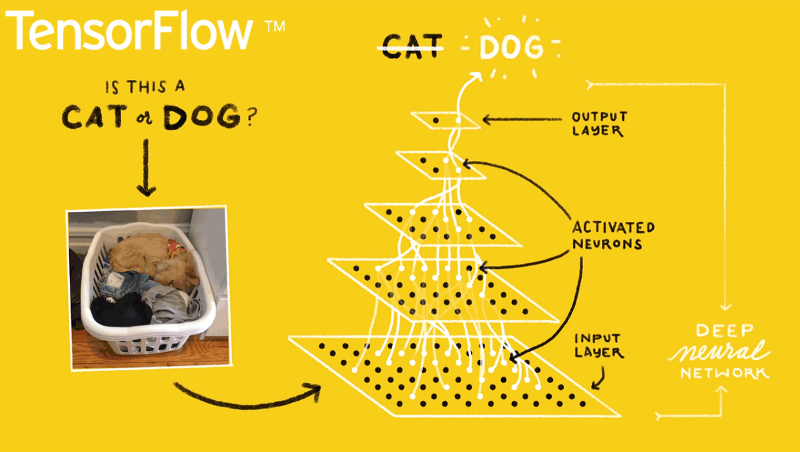
TensorFlow is an open-source software for carrying out numerical computations using data flow graphs. This framework is known for having an architecture that allows computation on any CPU or GPU, be it a desktop, a server, or even a mobile device. This framework is available in the Python programming language.
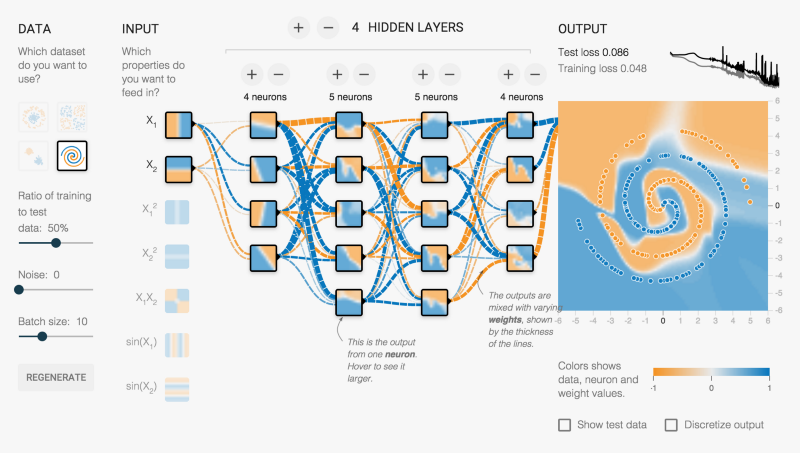
TensorFlow sorts through data layers called nodes and makes decisions with whatever information it gets. Check it out!
Image title
Pros:
  • Uses an easy-to-learn a language (Python).
  • Uses computational graph abstraction.
  • Availability of TensorBoard for visualization.
Cons:
  • It's slow, as Python is not the fastest of languages.
  • Lack of many pre-trained models.
  • Not completely open-source.

2. Microsoft CNTK

"An open source-deep learning toolkit."
Image title
Language: C++.
We could call this Microsoft's response to Google's TensorFlow.
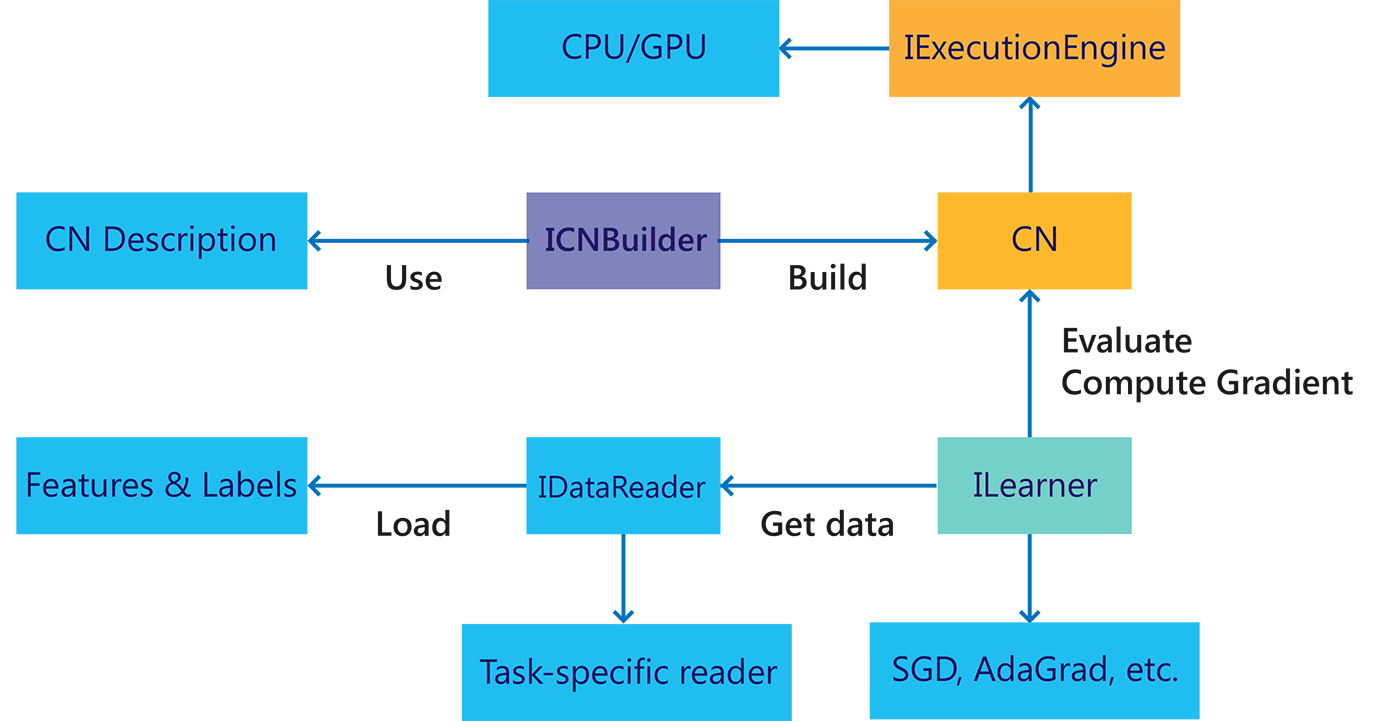
Microsoft's Computational Network ToolKit is a library that enhances the modularization and the maintenance of separating computation networks, providing learning algorithms and model descriptions.
CNTK can take advantage of many servers at the same time in a case where lots of servers are needed for operations.
It is said to be close in functionality to Google's TensorFlow; however, it is a bit speedier. Learn more here.
Image title
Pros:
  • It is very flexible.
  • Allows for distributed training.
  • Supports C++, C#, Java, and Python.
Cons:
  • It is implemented in a new language, Network Description Language (NDL).
  • Lack of visualizations.

3. Theano

"A numerical computation library."
Image title
Language: Python.
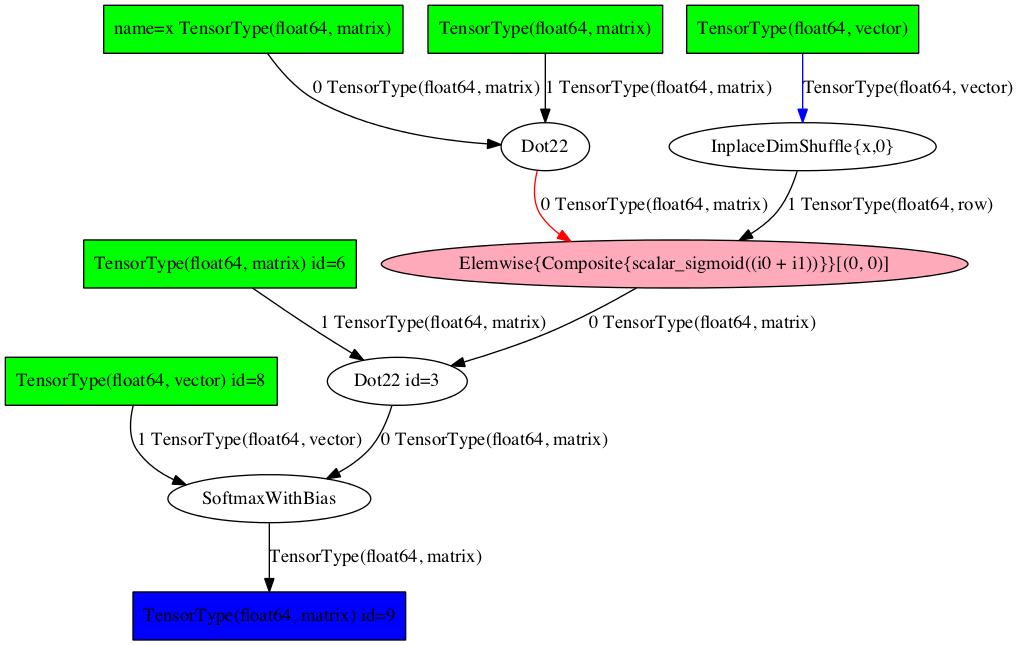
A strong competitor to TensorFlow, Theano is a powerful Python library that allows for numerical operations involving multi-dimensional arrays with a high level of efficiency.
The library's transparent use of a GPU for carrying out data-intensive computations instead of a CPU results in high efficiency in its operations.
For this reason, Theano has been used in powering large-scale computationally intensive operations for about a decade.
However, in September 2017, it was announced that major developments of Theano would cease after the 1.0 release, which was released in November 2017.
This doesn't mean it is a less powerful library in any way. You can still carry out deep learning research with it any time. Learn more here.
Image title
Pros:
  • Properly optimized for CPU and GPU.
  • Efficient for numerical tasks.
Cons:
  • Raw Theano is somewhat low-level compared to other libraries.
  • Needs to be used with other libraries to gain a high level of abstraction.
  • A bit buggy on AWS.

4. Caffe

"Fast, open framework for deep learning."
Language: C++.
Caffe is a powerful deep learning framework.
Like the other frameworks on this list, it is very fast and efficient for deep learning research.
With Caffe, you can very easily build a convolutional neural network (CNN) for image classification. Caffe works well on GPU, which contributes to its great speed during operations. Check out the main page for more information.
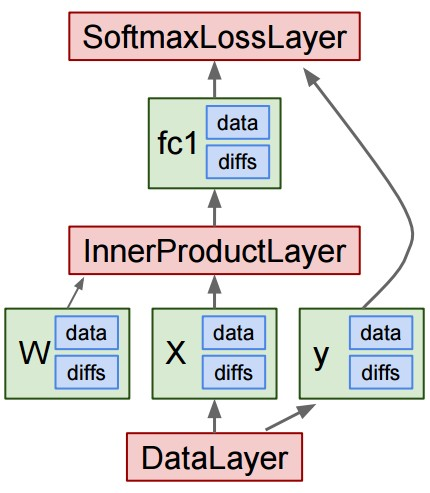
Caffe main classes:
Image title
Pros:
  • Bindings for Python and MATLAB are available.
  • Great performance.
  • Allows for the training of models without writing code.
Cons:
  • Bad for recurrent networks.
  • Not great with new architectures.

5. Keras

"Deep learning for humans."
Language: Python.
Keras is an open-source neural network library written in Python.
Unlike TensorFlow, CNTK, and Theano, Keras is not meant to be an end-to-end machine learning framework.
Instead, it serves as an interface and provides a high level of abstraction, which makes for easy configuration of neural networks regardless the framework it is sitting on.
Google's TensorFlow currently supports Keras as a backend, and Microsoft's CNTK will do the same in little or no time. Learn more here.
Image title
Pros:
  • It is user-friendly.
  • It is easily extensible.
  • Runs seamlessly on both CPU and GPU.
  • Works seamlessly with Theano and TensorFlow.
Cons:
  • Can't be efficiently used as an independent framework.

6. Torch

"An open-source machine learning library."
Language: C.
Torch is an open-source machine learning library for scientific and numerical operations.
It's a library based on — no, not Python — the Lua programming language.
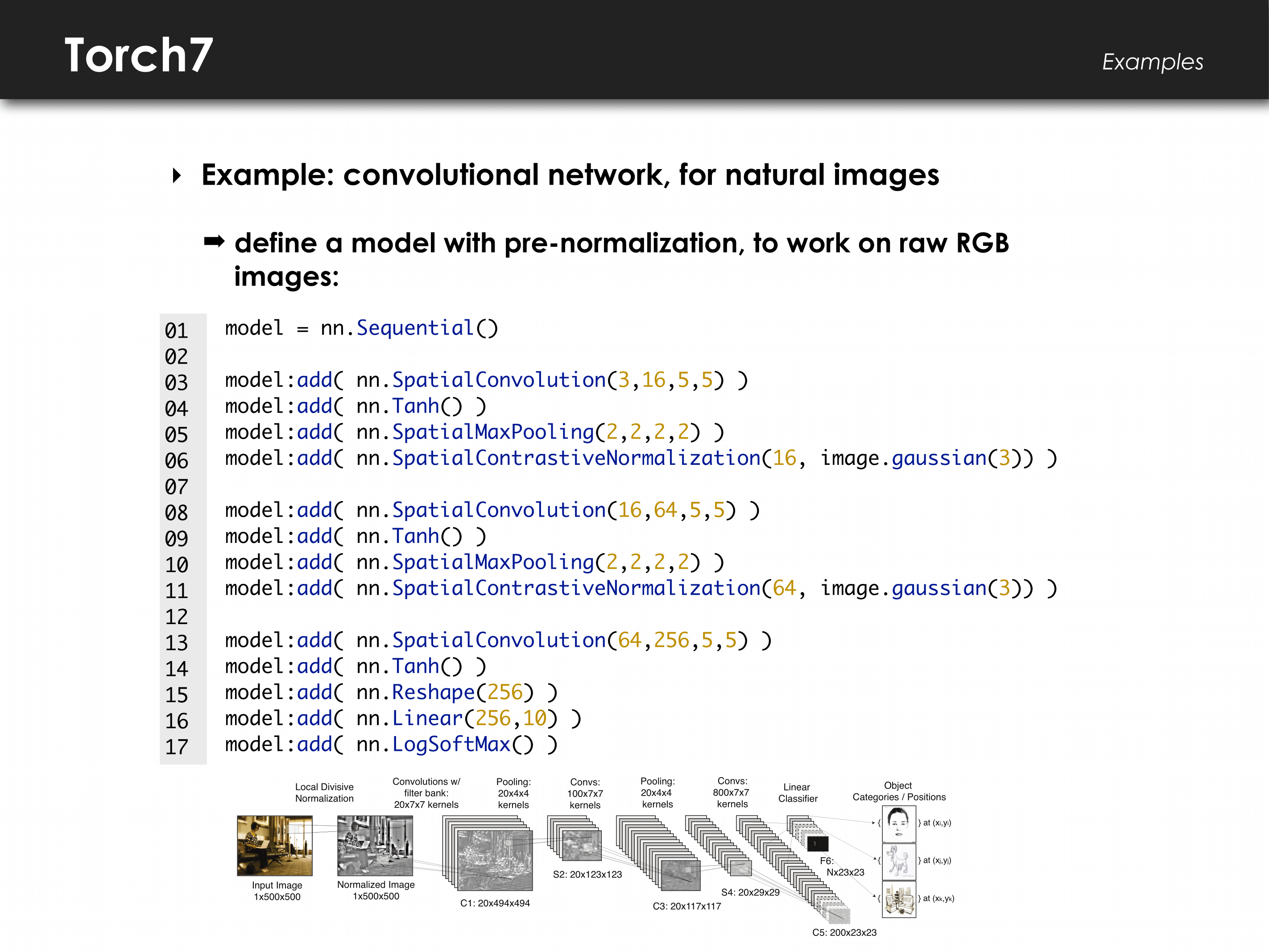
By providing a large number of algorithms, it makes for easier deep learning research and improved efficiency and speed. It has a powerful N-dimensional array, which helps with operations such as slicing and indexing. It also offers linear algebra routines and neural network models. Check it out.
Image title
Pros:
  • Very flexible.
  • High level of speed and efficiency.
  • Lots of pre-trained models available.
Cons:
  • Unclear documentation.
  • Lack of plug-and-play code for immediate use.
  • It's based on a not-so-popular language, Lua.

7. Accord.NET

"Machine learning, computer vision, statistics, and general scientific computing for .NET."
Language: C#.
Here is one for the C# programmers.
The Accord.NET framework is a.NET machine learning framework that makes audio and image processing easy.
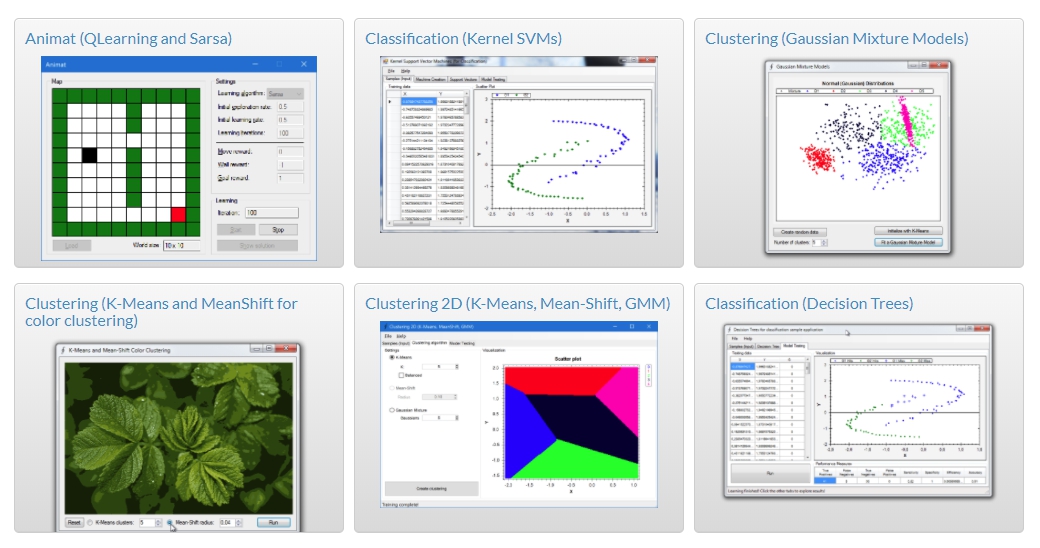
This framework can efficiently handle numerical optimization, artificial neural networks, and even visualization. Aside from this, Accord.NET is powerful for computer vision and signal processing and also makes for an easy implementation of algorithms. Check the main page.
Image title
Pros:
  • It has a large and active development team.
  • Very well-documented framework.
  • Quality visualization.
Cons:
  • Not a very popular framework.
  • Slow compared to TensorFlow.

8. Spark MLlib

"A scalable machine learning library."
Language: Scala.
Apache's Spark MLlib is a very scalable machine learning library.
It is very usable in languages such as Java, Scala, Python, and even R. It is very efficient, as it interoperates with the numpy in library Python and R libraries.
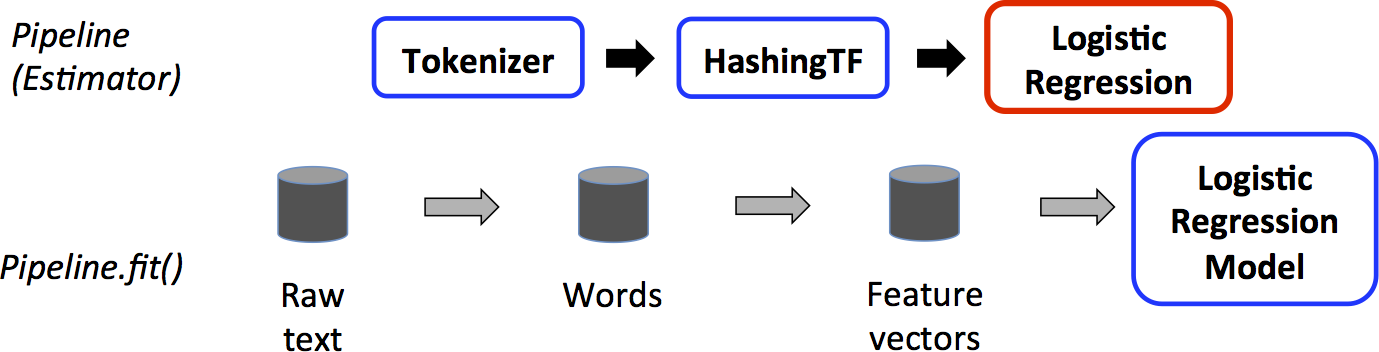
MLlib can easily be plugged into Hadoop workflows. It provides machine learning algorithms such as classification, regression, and clustering.
This powerful library is very fast when it comes to processing of large-scale data. Learn more on the website.
Image title
Pros:
  • Very fast for large-scale data.
  • Available in many languages.
Cons:
  • Steep learning curve.
  • Plug-and-play available for Hadoop only.

9. Sci-kit Learn

"Machine learning in Python."
Language: Python.
Sci-kit learn is a very powerful Python library for machine learning that is majorly used in building models.
Built using other libraries such as numpy, SciPy, and matplotlib, it is very efficient for statistical modeling techniques such as classification, regression, and clustering.
Sci-kit learn comes with features such as supervised learning algorithms, unsupervised learning algorithms, and cross-validation. Check it out.
Pros:
  • Availability of many of the main algorithms.
  • Efficient for data mining.
Cons:
  • Not the best for building models.
  • Not very efficient with GPU.

10. MLPack

"A scalable C++ machine learning library."
Language: C++.
MLPack is a scalable machine learning library implemented in C++. Because it's in C++, you can guess that it is great for memory management.
MLPack runs with great speed, as quality machine learning algorithms come along with the library. This library is novice-friendly and provides a simple API for use. Check it out.
Image title
Pros:
  • Very scalable.
  • Python and C++ bindings available.
Cons:
  • Not the best documentation.

Wrapping It Up

The libraries discussed in this article are very efficient and have proven over time to be of high quality. Big companies like Facebook, Google, Yahoo, Apple, and Microsoft make use of some of these libraries for their deep learning and machine learning projects — so why shouldn‘t you?
Can you think of any other library that you make use of very often that isn't on this list? Kindly share with us in the comments section!

Tuesday, December 24, 2019

A Tale of Two Industries: How Programming Languages Differ Between Wealthy and Developing Countries

Here at Stack Overflow, we’re interested in using our data to share insights about the worldwide software development community. This recent post on the distribution of mobile developers is a good example: it explored traffic to Android questions from around the world, and found that Android tended to be visited more from lower-income countries than from higher-income ones.
This leads us to wonder how else programming technologies may differ between rich and poor countries, and how that affects our picture of the global software development industry. In this post, we’ll explore these differences, and show that’s it’s useful to segment the software development industry into high-income countries and the rest of the world.
All the analyses explored here were performed on 2017 so far (January-August), on the 250 tags that had the most traffic during that time. To reduce the effect of noise, we analyzed only the 64 countries that had at least 5 million question visits in this time period. It’s also worth noting that this data represents activity among developers who understand English (some analyses of the Spanish and Portuguese sites suggest that similar trends apply for non-English speakers in countries such as Mexico and Brazil).

Technologies correlated with GDP per capita

In a recent post, we saw that the traffic to Android questions (as a percentage of a country’s Stack Overflow visits) tends to be negatively correlated with a country’s GDP per capita. This may lead us to wonder if the same is true of any other tags.
When we explore major programming languages and platforms, some that stand out besides Android include PHP, Python, and R.
The amount of Android and PHP traffic is negatively correlated with a country’s income, while Python and R are positively correlated. In each case we can see exceptions (Korea uses more Android than we’d expect, and China more Python), but generally the correlations are strong. (Each has an R2 around .5-6, with p-values < 10-6 after adjusting for multiple testing).
We’ll emphasize that we’re not suggesting any causality here. We’re certainly not suggesting that programming language choice affects a country’s average income, but we’re also not saying that a country’s wealth directly influences their use of technologies. We suspect that the drivers are likely a mixture of economic and social factors (level of education, age of the software industry, level of outsourcing) that are, in general, correlated with a country’s wealth.

How can we segment the software development industry in two?

When we’re examining trends, it’s useful to talk about two groups of countries (high income and non-high income) rather than considering a pile of correlations. As a useful pre-existing categorization, we could use World Bank income classification, which is based on GNI (gross national income) per capita (see here for discussion of this categorization).
There are 78 high-income economies, largely made up of the US and Canada, Western Europe, parts of the Middle East and East Asia, and Australia/New Zealand. I’ve done some analyses of the fundamental drivers of the between-country variation (such as principal component analysis) that suggest this is a reasonable division, and that it’s more meaningful than other ways we could divide them, such as Eastern vs Western Hemisphere. (For instance, Australia is generally more similar to the US and Europe in terms of visited technologies than it is to China or Indonesia).
The division splits Stack Overflow traffic into groups of about two-thirds and one-third: 63.7% of Stack Overflow’s traffic comes from high income countries. (This likely is due to a combination of greater proportion of software development, more widespread internet access, and a disproportionate share of English-speakers). Much of the traffic from non-high-income countries comes from India, followed by Brazil, Russia, and China.

How do high-income countries differ in the technologies they use?

We’ve now divided the software development world into two segments. How do high-income and non-high-income countries differ in terms of the technologies they use?
We can extract several interesting insights:
  • Difference in data science technologies: As we saw earlier, Python and R are associated with a country’s income. Python is visited about twice as often in high-income countries as in the rest of the world, and R about three times as much. We might also notice that among the smaller tags, many of the greatest shifts are in scientific Python and R packages such as pandasnumpymatplotlib and ggplot2. This suggests that part of the income gap in these two languages may be due to their role in science and academic research. It makes sense these would be more common in wealthier industrialized nations, where scientific research makes up a larger portion of the economy and programmers are more likely to have advanced degrees.
  • C/C++: C/C++ are two other notable languages that tend to be visited from high-income countries. One hypothesis is that this may have to do with education: as we saw in a previous post, C and C++ are among the languages more disproportionately visited from American universities. It could also be related to the geographic distribution of the electronics and manufacturing industries.
  • PHP and Android: We explored Android development around the world in a previous post, but PHP is another technology that’s notably associated with lower-income countries. It’s interesting to see that CodeIgniter, a PHP open source framework, is the tag that’s singularly most disproportionately visited from lower-income countries, by a large margin. Further examination shows it is especially heavily visited in South/Southeast Asia (particularly India, Indonesia, Pakistan and the Philippines) while it has very little traffic from the US and Europe. It’s possible that CodeIgniter is a common choice for outsourcing firms building websites.

Conclusion: why does this matter?

I was certainly interested in these results as a fun fact about the programming language ecosystem. But it also has implications for other data explorations we’ll be publishing in the near future.
When we ask questions about the software development industry, it’s important to know that we’re really answering two separate questions that have been “blended” together, and that separating them can sometimes give us more informative answers.
For example, we’re often interested in understanding which technologies drive the most traffic, such as examining technologies like Flash that are shrinking over time. If we were to create a list of the most visited programming technologies, it would be different for high-income and low-income countries:
For instance, in 2017 so far, Python is the second most visited tag among high-income countries, while it’s only the 8th most visited in the rest of the world. My language of choice, R, is the 15th most visited tag in high-income countries, but it doesn’t even make the top 50 most visited tags elsewhere.
This is important context when we’re using Stack Overflow data to learn about the developer ecosystem. An American tech recruiter interested in the future of the industry will need a different set of answers than an Indian student wondering what language to learn, or an investor looking to understand tech companies in Kenya.
In future posts, we’ll sometimes refer back to this division as we continue to explore the worldwide developer ecosystem.